

If you want to see what is happening inside every candle — who is buying, who is selling, and where the big players are positioned — ATAS is built exactly for that.
ATAS (Advanced Trading Analytical Software) is a professional order flow trading platform specialising in cluster analysis, volume profiling, and market microstructure analysis. It is the kind of tool that separates traders who react to price from traders who understand why price moves.
In this ATAS review, I will cover everything you need to know: the features that matter, the learning curve, the pricing, and whether it is worth committing to a platform that demands serious investment in both time and money.
Last updated 26 July 2026. All pricing in this review was verified directly against atas.net on that date and is quoted in euros, as the vendor lists it. We re-check pricing and features periodically; confirm current figures on the provider’s site before deciding.
Quick Verdict: ATAS
⭐ Rating: 8.4 / 10
Best for: Professional futures traders and order flow specialists who need the deepest possible volume and cluster analysis tools
Biggest strength: Unmatched depth of order flow visualization — 400+ Footprint chart variations, Smart Tape, DOM with analytical columns, HFT algorithm detection, and cluster analysis
Biggest weakness: Steep learning curve (1+ month to master), occasional freezing on Windows, and paid subscriptions required for advanced features after 14-day trial
What Is ATAS?
ATAS is a professional trading and analytical platform designed specifically for order flow analysis. While other platforms treat order flow as an add-on feature, ATAS builds its entire architecture around one mission: helping traders see what regular charts cannot show.
The platform processes raw order flow data — every trade, every bid, every ask — and visualizes it through Footprint charts (over 400 variations), Smart Tape, Smart DOM with analytical columns, Volume Profile, Market Profile, and proprietary indicators that track institutional activity, market imbalances, and high-frequency trading algorithms.
ATAS connects to over 25 exchanges and broker platforms, supports futures, stocks, and cryptocurrency markets, and includes over 300 built-in indicators. It is used by proprietary trading firms and professional traders worldwide.
Who is ATAS for?
- Order flow traders who base their decisions on volume, delta, and market microstructure rather than traditional technical indicators
- Futures traders (especially ES, NQ, CL, GC) who need professional-grade cluster analysis
- Scalpers who need real-time DOM analysis and Smart Tape to read market intent
- Crypto traders who want order flow analysis applied to digital assets
- Prop trading firms and professional trading desks that need institutional-quality analytical tools
ATAS Order Flow Features That Actually Matter
Footprint Charts (Cluster Charts) — ATAS’s Crown Jewel
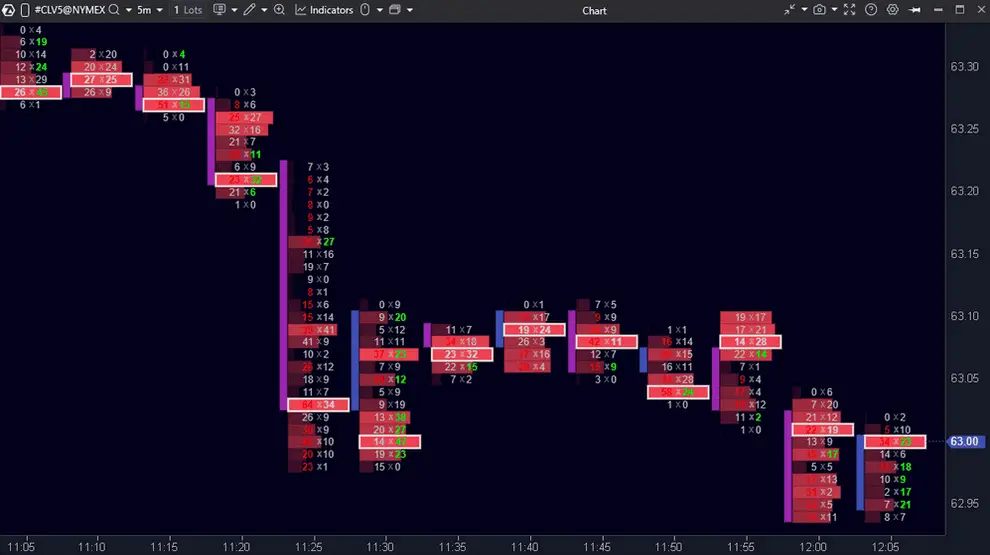
Footprint charts let you see inside every candle. Instead of just open, high, low, close, you see the exact bid and ask volume at every price level within every bar. ATAS offers approximately 400 variations of Footprint charts, including Delta Footprint, Bid x Ask, Volume, and custom cluster configurations.
This is not a gimmick. When you can see that a candle closed green but had aggressive selling throughout its range, you know the move is weak. When you see massive delta divergence at a key level, you know there is institutional interest. This is the kind of information that gives you an actual edge over traders who only see standard candlestick charts.
Smart Tape — Seeing What the Big Players Are Doing
ATAS’s Smart Tape reassembles fragmented trade prints into their original market orders. Since 2009, exchanges have been splitting large orders into smaller pieces. Most Time & Sales feeds show you the fragments. Smart Tape shows you the real orders — including size, aggression, and direction.
Combined with customizable filters, you can isolate large institutional orders from retail noise. This is one of ATAS’s most unique and valuable features, and it is difficult to replicate on any other platform.
Smart DOM — More Than an Order Book
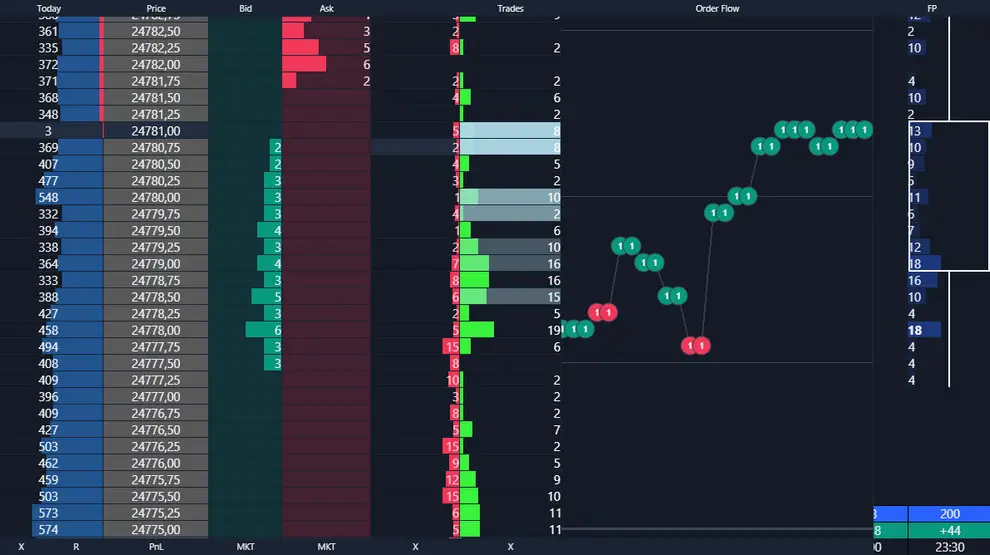
The Smart DOM goes beyond basic Level II data. It includes analytical columns showing hidden orders, buyer/seller imbalances at each price level, and data that helps identify when large bids or offers are being spoofed (placed and then removed to mislead other traders).
For scalpers who trade from the DOM, this is essential. The ability to distinguish real liquidity from fake liquidity is the difference between profitable and unprofitable scalping.
Volume Profile and Market Profile
ATAS includes comprehensive Volume Profile (showing volume distribution across price levels) and TPO/Market Profile (showing time spent at each price level). Both are fully configurable and can be applied across any timeframe, including composite profiles spanning multiple days or weeks.
HFT Algorithm Detection
One of ATAS’s most unique features is its ability to detect and visualise high-frequency trading activity. The platform identifies spoofing algorithms — orders that appear and disappear faster than the human eye can track — and highlights them so traders can understand when the order book is being manipulated.
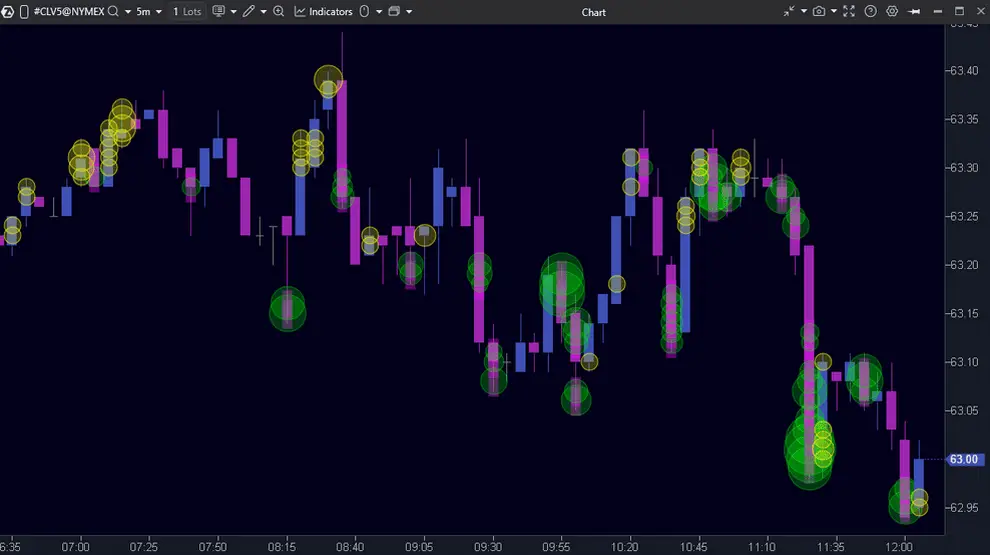
Big Trades Indicator
This proprietary indicator automatically flags unusually large trades on the chart. Rather than manually watching Time & Sales for big prints, ATAS identifies them and marks them at the exact price level where they occurred. This is invaluable for tracking institutional activity during key market moments.
Market Replay
ATAS includes a full market replay feature that lets you replay past trading sessions with full order flow data as if they were happening in real time. This is an excellent learning tool — you can practice reading order flow without risking money, and you can study past sessions to understand why price moved the way it did.
ATAS X vs Classic ATAS: What Actually Changed
Short answer. ATAS X is not a rival product or a separate purchase. It is ATAS’s next-generation client, currently in Beta, included on every plan including the free Start tier. It runs alongside the classic Windows application on the same account rather than replacing it. The headline change is native macOS support.
This is the single most common point of confusion about the platform right now, and it is worth being precise, because the naming invites the wrong assumption. People see “ATAS” and “ATAS X” and reasonably conclude they are choosing between two things. You are not. You get both.
| Classic ATAS | ATAS X (Beta) | |
|---|---|---|
| Operating system | Windows only | Windows and native macOS |
| Interface | Established workspace model | Rebuilt core, tab-based architecture |
| Speed | Baseline | ATAS claims roughly 2.5× faster response |
| Feature completeness | Full toolset, including strategy backtesting | Still rolling out; some advanced features and automated strategies are limited |
| Access | One subscription covers both. Paid plans (Plus, Pro, Ultra) grant access to both environments. | |
| Running both | Both can run simultaneously on the same account and IP. Certain simulation connectors cannot be active in both at once. | |
Scroll the table sideways on a phone.
Practically, that means the decision is not which one but when to switch. Classic remains the environment for anything involving strategy backtesting and the full advanced toolset. ATAS X is where you go for macOS, for the faster and cleaner interface, and increasingly for day-to-day chart work as parity closes. ATAS has signalled that X is the intended successor, but classic is still fully supported and there is no forced migration.
If you are on a Mac, this is the change that matters. Order flow platforms have historically pushed Mac users into virtual machines or Parallels, which adds latency and cost to a workflow where responsiveness is the entire point. Native macOS support removes that tax, with the caveat that you are using Beta software and should not put a funded account on it before you have run it in simulation for a while.
ATAS Pricing
| Plan | Start | Plus | Pro | Ultra |
|---|---|---|---|---|
| Monthly billing | €0 | €24.95 | €69.95 | €89.95 |
| Annual billing, per month | — | €19.95 | €39.95 | €49.95 |
| Annual billing, total | — | €239.40 | €479.40 | €599.40 |
| Simultaneous assets | 2 | 6 | 20 | Unlimited |
| Indicators per chart | 3 | 6 | 12 | Unlimited |
| Real-time futures data | No (15-min delay) | No (15-min delay) | Yes | Yes |
| Real-time stock data | No | No | Yes | Yes |
| Market Replay | No | Yes | Yes | Yes |
| Cross-Trading | No | No | Yes | Yes |
| Big Trades history | No | 7 days | 7 days (30 announced) | 7 days (90 announced) |
| Options Board & Strategy Analyzer (Beta) | No | No | No | Yes |
| Heatmap (Beta), ATAS X | Included on all tiers, free Start included | |||
| MBO Bundle | Ultra add-on (Iceberg, Stop Runs, Sweeps trackers), promotional availability to 27 Nov 2026 | |||
Prices in EUR as listed on atas.net. EU residents are charged VAT at their country’s rate. ATAS offers a refund within 14 days of a first purchase. Scroll the table sideways on a phone.
Pro vs Ultra: which tier do you actually need?
The honest answer for most traders is Pro. The jump from Plus to Pro is the one that changes what you can do, because it is where real-time futures and stock data arrive, along with Cross-Trading. Below Pro you are analysing delayed futures data, which is fine for study and useless for execution.
The jump from Pro to Ultra is a ceiling removal, not a capability unlock. You are paying €10 a month for unlimited assets instead of twenty, unlimited indicators per chart instead of twelve, longer Big Trades history, and the options tooling. Twenty simultaneous instruments and twelve indicators on one chart is more than almost any discretionary order flow trader uses. If you are watching a handful of instruments, Pro is the right stop.
Ultra earns its price in three situations: you trade options and want the Options Board, you genuinely run a wide multi-instrument watchlist, or you want the MBO order-book trackers while that bundle is still attached.
ATAS restructured its pricing in August 2025 into four tiers:
| Plan | Price | What you get |
|---|---|---|
| Start | Free | Basic volume analysis, real-time crypto data, delayed futures (15 min), 2 instruments, 3 indicators per chart, no stock data |
| Plus | €24.95/mo | 6 instruments, 6 indicators, Big Trades, CVD Pro, Market Replay, Range/Renko/Reversal timeframes, 7 days Big Trades history |
| Pro | €69.95/mo | Real-time futures and stock data, 20 instruments, 12 indicators, 3 active connections, all chart types |
| Ultra | €89.95/mo | Unlimited instruments, indicators and connections, all tools unlocked, plus the Ultra-only MBO Bundle |
Lifetime access: Plus €999 | Pro €1,799 | Ultra €1,999. Annual billing cuts the monthly rate to €19.95 (Plus), €39.95 (Pro) and €49.95 (Ultra), a saving of up to 44%.
Two things to note on cost. ATAS prices in euros, not dollars, and EU residents pay VAT at their national rate on top, so budget accordingly if you are converting from another currency. Big Trades history is currently capped at 7 days on Plus, Pro and Ultra alike; the vendor lists 30-day and 90-day tiers as coming soon.
The Ultra tier also includes the MBO Bundle — the Iceberg Tracker, Sweeps Tracker and Stop Runs Tracker, which surface hidden limit orders, sharp liquidity absorptions and clusters of resting stops. ATAS lists it as temporarily free instead of €129 a month, an offer it states runs to 27 November 2026. The MBO indicators currently work only through the Rithmic connector, with dxFeed support in development.
All paid plans include a 14-day free trial with full functionality. Note that like Quantower, market data subscriptions from your broker or data provider are separate costs.
Seen enough of the pricing? The 14-day trial unlocks the full platform, and the free Start tier never expires. Test the footprint charts and Smart DOM on your own instruments before you commit.
How Reliable Is ATAS? Performance, Stability and the Real Downsides
ATAS is powerful, but it is demanding software, and a few practical issues come up often enough in user reviews that you should weigh them before committing.
The most common complaint is resource usage. ATAS is heavy on memory, and traders running several workspaces or many footprint charts at once report high RAM consumption and occasional slowdowns during long sessions. On Windows, some users also report the platform freezing, which is a real concern when you have live positions, so a capable machine and a stable data connection matter more here than with a lightweight charting app.
The interface is the other recurring gripe. It is dense and functional rather than modern, and new users routinely describe the first few days as overwhelming. That is the trade-off for the depth on offer.
Two practical points are easy to miss. First, the platform fee does not include market data. Real-time futures and stock data require a separate feed from a provider such as CQG or Rithmic, or your broker, although crypto data is available without an extra feed. Second, ATAS is focused on futures, stocks and crypto, and is not built for spot forex or CFDs, so forex traders will need a different platform.
On operating systems, the picture changed in 2026. The mature ATAS client is Windows software, and for years Mac users ran it through Parallels, Boot Camp or a virtual machine. ATAS now also ships ATAS X, a rebuilt version listed for both Windows and macOS, which the vendor claims runs around 2.5 times faster on its own internal testing. It is still labelled beta at the time of writing, so a Mac trader should treat it as promising rather than proven, and test it thoroughly before relying on it with live positions. There is still no mobile app and no Linux build.
None of this makes ATAS unreliable as a tool. Reviews on Trustpilot and G2 are broadly positive, and the support team is frequently singled out for praise. The honest summary is that ATAS is a professional instrument that rewards a capable setup and a genuine time investment, not a plug-and-play app.
Real Pros and Cons
What ATAS Gets Right
- Deepest order flow analysis available at retail pricing. The combination of Footprint charts, Smart Tape, Smart DOM, and HFT detection is unmatched.
- Everything is built-in. Features that cost hundreds in third-party add-ons on NinjaTrader come included with ATAS.
- The 14-day free trial is fully functional. You get the complete platform to evaluate before paying anything.
- Excellent customer support. The ATAS support team is consistently praised for fast, hands-on assistance via Telegram and remote desktop sessions.
- Regular updates. Beta versions with improvements are released approximately twice a week. The development team actively incorporates user feedback.
- API for custom indicators. C# scripting support lets advanced users build proprietary indicators and trading bots.
- Market Replay is a powerful learning tool. Replay any session with full order flow data to practice and study.
What ATAS Gets Wrong
- The learning curve is serious. Budget at least a month to become comfortable with the platform. Order flow analysis itself takes time to master, and ATAS’s feature depth can be overwhelming.
- Occasional freezing on Windows. Multiple reviews mention the platform freezing during live trading — a significant concern when you have open positions.
- The interface and drawing tools feel dated. Compared to TradingView‘s polished experience, ATAS looks and feels more utilitarian.
- Desktop only, and macOS support is still beta. The mature client is Windows. ATAS X adds macOS but carries a beta label. No Linux build and no mobile app.
- Market data costs extra. The subscription fee is just the platform. Budget additional costs for real-time data from CQG, Rithmic, or your broker.
- Tiered feature restrictions on lower plans. The free and Plus tiers limit the number of instruments and indicators, which can be frustrating as you advance.
User Experience
Learning curve: High. ATAS is not a platform you will master in a weekend. The order flow concepts alone require dedicated study, and the platform’s depth of features means there is always more to learn. Expect a month minimum to become productive, and significantly longer to master the advanced tools.
Interface: Functional rather than beautiful. The focus is on data density and analytical power, not visual polish. If you have used Bloomberg Terminal, the design philosophy is similar — substance over style.
Real-world workflow: Open your trading session with a multi-panel workspace: Footprint chart showing delta at each price level, Volume Profile overlay showing the day’s value area, Smart DOM on the right for order book analysis, and Smart Tape filtered for large orders only. Watch for divergences between price movement and order flow (price rising but large sellers dominating the tape), and execute from the DOM when your order flow edge aligns with key levels.
Who Should Use ATAS
- Dedicated order flow traders — ATAS is built for you, full stop
- Futures scalpers who need DOM analysis and tape reading tools
- Experienced traders who want to understand market microstructure at the deepest level
- Crypto order flow traders who want professional tools applied to digital assets
- Prop firm traders who need an analytical edge to pass challenges and maintain funding
Recognise yourself in that list? The trial runs the full platform for 14 days, and the free Start tier never expires. Two weeks in the simulator will tell you more than any review can.
Who Should NOT Use ATAS
- Beginners. If you are still learning basic technical analysis and risk management, ATAS will overwhelm you. Master the fundamentals first, then graduate to order flow.
- Traders who only use standard chart patterns and indicators. ATAS is overkill if you do not plan to incorporate volume and order flow analysis.
- Long-term investors. Order flow analysis is relevant for short-term trading. If you hold positions for months, these tools are unnecessary.
- Mobile-only traders, and Mac users who need a proven build. Desktop only. macOS is supported through ATAS X, which is still in beta.
ATAS vs Alternatives
ATAS vs Quantower
The most direct comparison in the order flow space. ATAS has a slight edge in pure order flow depth — Smart Tape reassembly, HFT detection, and Footprint chart variety. Quantower has an edge in broker connectivity (60+ vs 25+), workspace customization, and copy trading. If order flow analysis is your primary focus, ATAS may be the better choice. If you need broader multi-asset, multi-broker flexibility, Quantower may be better. See our full ATAS vs Quantower comparison for the head-to-head.
ATAS vs NinjaTrader
NinjaTrader has a much larger ecosystem and is the standard for US futures trading. However, achieving ATAS-level order flow analysis on NinjaTrader requires expensive third-party add-ons (Footprint charts, Volume Profile indicators, advanced DOM tools). ATAS includes all of this natively for less total cost.
ATAS vs Sierra Chart
Sierra Chart is the speed and stability champion — lighter, faster, and cheaper. ATAS offers a more visual and intuitive approach to order flow analysis, and the Smart Tape feature has no direct Sierra Chart equivalent. Sierra Chart is better for traders who prioritize raw performance. ATAS is better for traders who want the most visual and comprehensive order flow analysis.
Frequently Asked Questions
Is ATAS worth it?
For traders who are committed to order flow analysis, yes. The depth of volume and cluster analysis tools is unmatched at this price point. However, you need to be willing to invest significant time in learning the platform. If you are not going to use the order flow tools, ATAS is overkill.
Is ATAS legit?
Yes. ATAS has been operating for over a decade, is used by proprietary trading firms and professional traders worldwide, and is run by ATAS LLC, registered in Riga, Latvia. Third-party ratings on Trustpilot and G2 are broadly positive, and its support team is consistently singled out for praise. Ratings move, so check the current scores yourself rather than relying on a figure quoted in any review.
Is ATAS free?
The Start plan is free forever with basic functionality. All paid plans include a 14-day free trial with full features. After the trial, advanced tools require a paid subscription.
Can I use ATAS for crypto trading?
Yes. ATAS connects to major cryptocurrency exchanges and applies the same order flow analysis tools to crypto markets. The Start (free) plan includes real-time crypto data.
What is ATAS X, and is it different from ATAS?
ATAS X is ATAS’s next-generation client, currently in Beta. It is not a separate product or an extra purchase: it is included on every plan, including the free Start tier. It runs alongside the classic Windows application on the same account and the same IP address, so you are not choosing between them. The main differences are native macOS support, a rebuilt core that ATAS says responds about 2.5 times faster, and a tab-based interface. Classic ATAS remains fully supported and still holds some advanced features, including strategy backtesting, that are still rolling out in X. Note that certain simulation connectors cannot be active in both environments at the same time.
Should I switch from classic ATAS to ATAS X?
Not wholesale, not yet. Use ATAS X if you are on macOS, or if you want the faster and cleaner interface for day-to-day chart work. Stay in classic for strategy backtesting and any advanced feature that has not reached parity. Because X is Beta software, run it in simulation before you put a funded or prop account through it. ATAS has indicated X is the intended long-term successor, but there is no forced migration and classic is still supported.
Does ATAS work on Mac?
Yes, but with a caveat. The long-standing ATAS client is Windows-only, and Mac users have traditionally run it through Parallels, Boot Camp or a virtual machine. ATAS now also offers ATAS X, a rebuilt version listed for both Windows and macOS, which the vendor says is around 2.5 times faster on its own internal tests. ATAS X carries a beta label, so treat native Mac support as workable but not yet mature, and test it before trading live on it. There is no mobile app.
Is ATAS good for beginners?
Not really. ATAS is built for order flow analysis, which is an advanced discipline, and the platform’s depth can overwhelm new traders. If you are still learning basic technical analysis and risk management, master those first. Committed beginners can start on the free Start plan and use Market Replay to learn gradually.
Does ATAS require a separate data feed?
For real-time futures and stock data, yes. The subscription covers the platform only, and live market data comes from a provider such as CQG or Rithmic, or your broker, at an additional cost. Crypto data is available in real time without an extra feed, including on the free Start plan.
Does ATAS support forex?
ATAS is built for futures, stocks and crypto, where centralised order flow data is available. It is not designed for spot forex or CFDs, so forex traders will need a different platform.
Is ATAS better than Quantower?
It depends on your priority. ATAS has the edge in pure order flow depth, including Smart Tape reassembly and HFT detection, while Quantower connects to more brokers and offers broader multi-asset flexibility. Many order flow specialists prefer ATAS; multi-asset traders often prefer Quantower.
How much does ATAS cost?
ATAS is priced in euros across four tiers. Start is free forever. Plus is €24.95 a month, Pro is €69.95, and Ultra is €89.95, with annual billing cutting those to roughly €19.95, €39.95 and €49.95. Most order flow traders land on Pro, because that is where real-time futures and stock data arrive. Lifetime licences and a promotional MBO bundle also exist. Market data is a separate cost on top, and EU residents pay VAT at their national rate.
Is Bookmap or ATAS better?
They solve different halves of the same problem. Bookmap is the specialist for a live liquidity heatmap, showing resting orders building and pulling in real time, and many traders run it purely for that view. ATAS is the broader order flow workstation: footprint charts, Smart Tape, Smart DOM, volume and market profile, and execution in one place. If a real-time heatmap is the single thing you want, Bookmap is hard to beat. If you want a complete order flow platform and will invest the time to learn it, ATAS does more. A fair number of order flow traders end up running both.
What are the best alternatives to ATAS?
Quantower (multi-asset order flow), NinjaTrader (largest futures ecosystem), Sierra Chart (speed and stability), Bookmap (visual liquidity heatmaps), and Jigsaw Trading (DOM scalping tools).
Final Verdict
ATAS is not a casual trading platform. It is a professional-grade analytical environment designed for traders who are serious about understanding market microstructure. The learning curve is steep, the commitment is real, and the rewards are only available to those who put in the work.
But if you are willing to invest the time, ATAS gives you a level of market transparency that most retail traders never access. Seeing inside every candle, reading the real tape, tracking institutional activity, and identifying algorithmic manipulation — these are capabilities that fundamentally change how you understand price movement.
Our recommendation: Start with the 14-day free trial. Set up a basic workspace with a Footprint chart, Smart DOM, and Volume Profile. Trade in the simulator for two weeks. If the order flow data starts making sense and improving your reads on market structure, commit to the Plus plan (€24.95 a month, or €19.95 on annual billing) and move up only when a specific limit actually blocks you.
📄 Free Download · Platform Reference Sheet
ATAS Reference Sheet 2026 (PDF)
Five pages: verified pricing across every tier and billing period, the full feature matrix, the real cost stack including data feeds, the head-to-head against Quantower, NinjaTrader and Sierra Chart, and a two-week evaluation plan. Pricing checked against atas.net on 26 July 2026. Free, no email required.
See What Charts Cannot Show You
Try ATAS free for 14 days and experience professional order flow analysis.
→ Platform comparisons: ATAS vs Quantower · ATAS vs MotiveWave
 The Complete Trader's Edge
The full Mind · Method · Money framework. 70 chapters.
View on Amazon →
The Complete Trader's Edge
The full Mind · Method · Money framework. 70 chapters.
View on Amazon →
 Market Mayhem
400 years of bubbles, crashes, and the pattern that keeps repeating.
Buy on Amazon →
Market Mayhem
400 years of bubbles, crashes, and the pattern that keeps repeating.
Buy on Amazon →
 Greatest Companies
How the world's greatest companies were built — and what traders learn from them.
View on Amazon →
Greatest Companies
How the world's greatest companies were built — and what traders learn from them.
View on Amazon →
 Greatest Traders
Eighty-six lives that explain the markets — Livermore to Madoff, told with the losses left in.
View on Amazon →
Greatest Traders
Eighty-six lives that explain the markets — Livermore to Madoff, told with the losses left in.
View on Amazon →