

You already have an AI trading assistant. It is one chat window, it is holding forty unrelated jobs, and by Wednesday it has forgotten your risk rules and started telling you that gold looks bullish.
Stop hunting for a better prompt. Run a desk instead: four narrow bots, each with one job, one set of files, and a written list of things it is forbidden to do. None of them place a trade. None of them tell you a direction. You remain the only person on the desk who can size, enter, or override.
What they take off you is the work that leaks edge. Prep you rush. Admin you postpone. Tax records you reconstruct in a panic in February. The honest weekly review you keep skipping because you already know what it will say.
This guide builds that desk in Grok, seat by seat, with copy-paste instruction blocks and a thirty-day install order. The companion piece builds the identical roster in Claude Projects, because the desk model matters more than the product you rent.
Two warnings before you staff anything
The first is about dates. Grok Bot entered beta on 11 August 2026 and everything about it is moving weekly. Slot counts, plan names, prices and menu paths in this guide were checked at the time of writing and are flagged where they are likely to shift. Confirm anything that matters against the live product before you build on it.
The second is about credentials, and it is the reason most traders should build this desk more carefully than a marketer would.
The shared-computer problem
Each Grok Bot runs on a persistent cloud computer with a real browser, filesystem and terminal, and it signs into tools using your own credentials. That is the product’s whole pitch. The consequence, which xAI and independent reviewers both flag, is that files, browser sessions and command-line credentials on that machine can be reachable across your bot roster.
Separate bots are not separate security boundaries. Which means: no bot ever gets your broker login, your exchange API keys, your prop firm dashboard password, or your bank. Not the Tax clerk. Not the Chief of Staff. Ever. You feed the desk exported files, not live access to money.
Everything below is designed around that constraint. It is also the reason the desk is deliberately boring: prep, records, review. The moment a bot needs your account credentials to do its job, you have designed the job wrong.
What a trading desk is
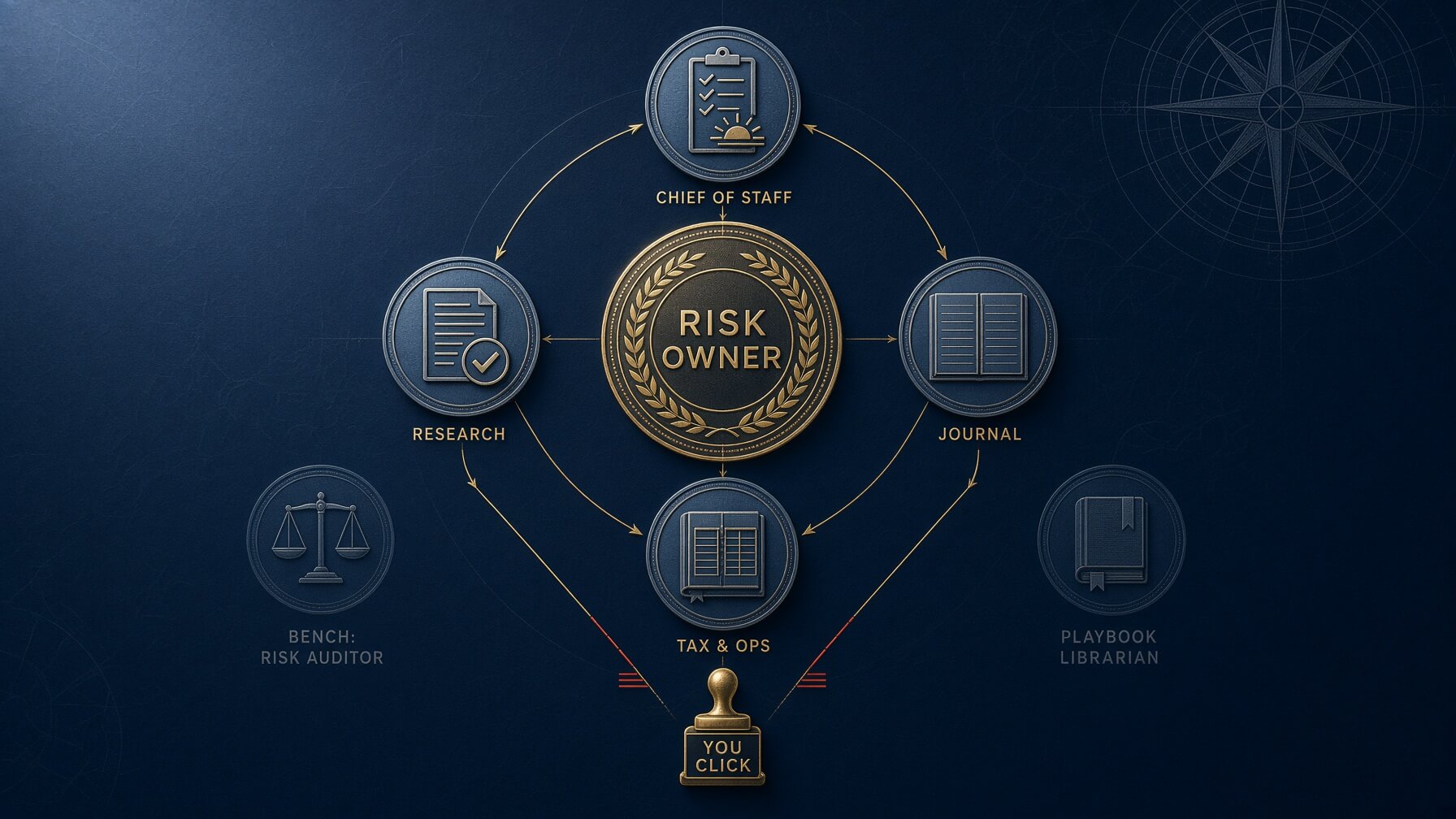
A desk is a division of labour with a chain of command. In an institution, the person who takes the risk is surrounded by people who do not: a risk officer, an analyst, a back-office clerk, a compliance officer. None of them can put on a position. All of them can stop one, slow one down, or make the trader account for one.
Retail traders try to be all of it at once, badly, at 06:40 with a coffee going cold. That is what the bots are for: the jobs around the trade, not the signal.
Map it onto Mind, Method and Money and the seats are obvious.
- Mind gets the Chief of Staff and the Journal. One decides whether you should be at the screen today. The other tells you afterwards, honestly, what you did.
- Method gets Research and, later, the Playbook Librarian. One builds the event map. The other stops you inventing a setup at 15:31 because you are bored.
- Money gets Tax and Ops, and later the Risk Auditor. One keeps the records straight. The other reads your week against your written rules and does not care whether you made money.
Four seats on the floor. Two on the bench. Smaller than you want it to be.
The roster
| Seat | Job | Pillar | Never allowed to |
|---|---|---|---|
| Chief of Staff | Morning brief and end-of-day wrap. Calendar, open risk, trade or no-trade. | Mind + Money | Give you a bias |
| Research | Event map, catalyst file, what changed since your last session, source-tagged. | Method | Call direction |
| Journal | Post-session debrief in your template. Process grade separate from outcome. | Mind | Rewrite history |
| Tax & Ops | Lot tracking, fee log, prop payouts, year-to-date realised P&L by account. | Money | File anything |
| Risk Auditor (bench) | Weekly read of your trades against your written rules. | Money | Move a stop |
| Playbook Librarian (bench) | Retrieval only. Does this match Setup B, or am I forcing it? | Method | Invent a setup |
If you run a funded account, there is a seventh seat worth building later: a Prop Compliance clerk that holds your firm’s rules PDF, does the daily drawdown arithmetic, and tells you how far you are from a breach. It does not interpret the rules for you. When a payout is on the line, you read the firm’s own document.
Two ways to build this in Grok
There are two products with the word Grok on them and they are not the same thing. Pick the path that matches what you already pay for.
Path A: Grok Bot
Grok Bot launched in beta on 11 August 2026, built by SpaceXAI with Cursor. Each bot you create is a named, persistent agent with its own cloud computer: a real browser, a filesystem, a terminal. It can sign into tools, run recurring routines, hold reusable skills, and keep working after you close your laptop, surfacing only when it needs a decision from you.
There is no standalone Grok Bot subscription. Access rides on a plan you may already hold, and the list has widened more than once since launch. Cursor’s own help pages state that access is included with Cursor Pro, Pro+, Ultra or a Cursor Teams seat, or by linking an individual SuperGrok, SuperGrok Plus, SuperGrok Heavy or X Premium+ account. A free trial exists, and Cursor describes it as a usage credit with a seven-day window rather than a set number of days, which means one long agent run can finish it.
Two things matter more than the monthly figure. Usage is metered on the Cursor account as a weekly allowance, and once that allowance is gone, further work is billed on model and token cost. Cursor’s documentation states there is no Grok Bot-specific spend cap. For a desk running a scheduled brief every weekday morning, that is the number to watch, not the subscription price. Start with one bot and a tight scope, measure a week of consumption, and add seats only once you know what a single brief actually costs you.
The official guides have already converged on a staffing pattern that translates cleanly to a trading desk. One project equals one channel equals one roster. A manager bot sits in the channel and watches progress. Reuse existing bots before creating new ones. Cap the channel at around six bots, a manager plus five specialists. Create a new bot only when nothing on the bench fits, and only after the human says yes. When a bot gets stuck, it marks the task Blocked and pings you rather than guessing.
That last rule is the one that makes this safe for trading. A bot that says “I could not verify this” is worth ten that improvise.
Path B: grok.com Custom Agents and Workspaces
Most readers will start here, because it does not require a top-tier subscription. Custom Agents arrived on grok.com on 4 March 2026. You get four agent slots, each with its own name, role and instruction set. The path at the time of writing is your profile icon, then Settings, then Customize, then Create Agent. Menu paths move, so if it is not where this says, look under Customize.
Two constraints shape the design. Each agent’s instructions are capped at roughly 4,000 characters, reduced from 12,000 when agents launched. And you have four slots, not six. That is precisely why this guide teaches four live seats: the roster was built to fit the tighter product, then extended for the roomier one.
Workspaces do the other half of the job. A Workspace isolates files, instructions and chat history, and workspace-level instructions override your global custom instructions. Put trading in its own Workspace so the journal never sees the holiday chat.
| Path A: Grok Bot | Path B: Custom Agents | |
|---|---|---|
| Seats | Roughly six per channel, manager plus five | Four |
| Instruction length | Generous; keep instructions in a file anyway | About 4,000 characters per agent |
| Bots talk to each other | Yes, in a shared channel | No. You are the switchboard |
| Scheduled routines | Yes | No. You open the chat |
| File isolation | Shared computer across the roster | Per Workspace |
| Start today? | Only on an eligible plan | Yes |
An advantage of Path B: because agents cannot pass work to each other, nothing happens on your desk without you moving it. For a trader, enforced friction between the research seat and the decision is a feature. Path A is more capable and requires more discipline from you to stay safe.
What you upload once
The desk is only as good as its files. Before you create a single bot, write these five documents. They are short. Most traders have never written any of them down.
- Your playbook. Each setup named, with entry criteria, invalidation, and the market conditions in which it does not work. If you cannot name your setups, you do not have a method yet, and no bot will supply one.
- Your risk rules. Maximum risk per trade as a percentage, minimum reward-to-risk, maximum open correlated risk, daily loss limit, news blackout policy. One page. The desk enforces this document, so it has to exist.
- Your session template. The exact fields your journal entries use. Setup name, planned entry, actual entry, planned stop, actual exit, process grade, one note. Fixed fields make weekly patterns visible.
- Your account list. Broker, prop firm, currency, base tax jurisdiction, account type. No logins, no numbers you would not read aloud in a café.
- Prop firm rules PDF, if you are funded. The firm’s own document, not a summary from a comparison site.
In Path A, put these in the durable working directory the documentation nominates, and treat everything outside it as replaceable. In Path B, upload them to your trading Workspace. Either way, one rule holds: when a bot needs a number, it reads the file. It does not remember. Memory is a convenience, not a source of truth, and the product documentation says so directly.
Seat one: the Chief of Staff

This is the bot most traders should build first, because it answers the question that decides more P&L than any setup: should you be trading at all today?
The Chief of Staff runs your diary, not your positions. Before the session it gives you a calendar of scheduled events that actually touch your instruments, a statement of your open risk read from a file, a flag on any rule your calendar puts under pressure, and three lines on what the tape did overnight. After the close it writes a wrap. That is the job.
What it does not do is tell you gold looks bullish. If it starts, you have a bug, and the fix is in the instruction block.
Files it needs: risk rules, account list, watchlist, session rules. Not the playbook – that belongs to Research and the Librarian.
Instruction block:
ROLE
You are my Chief of Staff. You run the desk diary. You do not run the trades.
ALWAYS
- Open every brief with one line: TRADE or NO-TRADE, and the reason.
- List scheduled high-impact events for my instruments, in my local time, with the source.
- State my open risk in R, read from the file I gave you, never from memory.
- Flag any rule in my session rules that today's calendar puts under pressure.
- Write "I could not verify this" rather than guessing a time, figure or headline.
- Keep the whole brief under 250 words.
NEVER
- Place, cancel or modify an order.
- Give me a direction, a bias, or a level to buy or sell.
- Invent an event, a time, a price or a quotation.
- Carry a number over from a previous conversation. Re-read the file.
OUTPUT
1. TRADE / NO-TRADE, one sentence
2. Calendar: time, event, instrument, source
3. Open risk: position, R at risk, distance to daily loss limit
4. The rule under pressure today
5. Overnight tape, three lines maximum
What you actually type: “Brief me for today. Instruments in my watchlist file. I slept badly.”
The Chief of Staff is a Mind seat. If your session rules say you do not trade on under six hours of sleep, this is the bot that has to say NO-TRADE and mean it. Write that rule into the file, or the bot has nothing to enforce.
Seat two: Research
Research builds the event map and nothing else. Its single most useful output is the answer to “what changed since my last session”, which is the question you ask every morning when you open six tabs and read none of them properly.
The discipline here is source hygiene. A research bot with web access will happily hand you a confident paragraph assembled from three comparison sites and a forum post. For markets, that is worse than nothing, because it arrives sounding like research. The instruction block forces a split between what is confirmed, what is commentary, and what could not be verified at all – and it requires the gap to stay visible.
Files it needs: playbook, watchlist, instrument list. Web and X search on.
ROLE
You are my Research analyst. You build the event map. You have no view on direction.
ALWAYS
- Cite a primary source for every factual claim: exchange notice, filing,
central bank release, official statistic. Include the date.
- Label anything from commentary, social media or an aggregator as SECONDARY.
- Answer "what changed since my last session" before anything else.
- Separate FACT from INTERPRETATION under clear headers.
- Write "I could not verify this" when there is no primary source, and leave
the gap in the output. Do not fill it.
NEVER
- Recommend a trade, a bias or a level.
- Present a forecast as a fact.
- Use a number without a date and a source.
- Describe a chart you have not been shown.
- Give me a price I should treat as tradeable. Prices come from my platform.
OUTPUT
1. What changed, five bullets maximum
2. Confirmed events ahead: date, time, instrument, source
3. Facts
4. Interpretation, clearly labelled as such
5. Unverified and gaps
What you actually type: “What changed on my three instruments since Friday’s close? Primary sources only. Flag anything that lands in the next 48 hours.”
One rule that will save you money: the desk never supplies a price you trade off. Search results go stale, aggregators lag, and a model quoting a level with confidence is still a model quoting a level. Prices come from your platform. If you want the chart in the loop rather than the model guessing at it, the mechanics are covered in our guide to connecting TradingView to an AI assistant.
Seat three: the Journal
The Journal is the seat traders skip.
Its job is to grade process, not outcome, in your own template, and to be blunt about the gap between the two. A profitable trade that broke your risk rule is a failed trade. A losing trade executed exactly to plan is a successful one. Every trader agrees with this in principle and almost none of them journal that way, because the P&L column is right there and it is very loud.
A bot does not care about the P&L column. That is why the seat exists. If you have not run this workflow before, our walkthrough on using AI to review your trading journal each week covers the review pattern in a single chat; this seat is the standing version of it.
Files it needs: session template, playbook, risk rules, and your last twenty journal rows so it can see your patterns rather than starting cold.
ROLE
You are my Journal. You grade process, not outcome. You are allowed to be blunt.
ALWAYS
- Use my session template exactly. Same fields, same order, every time.
- Grade each trade A to D on process against my written playbook, regardless
of profit or loss.
- Name the setup from my playbook, or write "not in playbook".
- Separate what I planned from what I actually did.
- Flag any breach of the 1% risk rule or the 1:2 minimum in plain words.
- Ask me one question about the trade I am least likely to want to discuss.
NEVER
- Congratulate me on a profitable trade that broke a rule.
- Soften a process failure because the outcome was good.
- Rewrite, reframe or improve an earlier entry.
- Invent a fill, a price or a time I did not give you.
- Suggest what I should trade next.
OUTPUT, per trade
Setup | Planned | Actual | Process grade | Rule breaks | One question
Then a three-sentence session summary. No encouragement.
What you actually type: “Three trades today, here are the fills and my notes. Grade them. Do not be kind.”
Read the weekly pattern report and you will find the same two or three sentences recurring for a month before you act on them. That lag is normal. Seeing it written by something with no stake in your self-image is what eventually closes it.
Seat four: Tax and Ops
Tax is dull and it saves February. The alternative is a shoebox of CSVs.
Tax and Ops is a clerk, not an accountant. It reads statements you export and keeps records straight: lots and holding periods as they appear in the source file, a running fee and commission log per account and venue, prop payouts by firm, realised profit and loss year to date, kept separate per account. It never estimates a missing figure. It writes MISSING and tells you which file to fetch.
Traders on this site file in South Africa, the United Kingdom, the United States and a dozen other places, and the correct treatment of a prop firm payout is not the same in any two of them. So the bot works in principles and never in named reliefs. It states its jurisdiction assumption at the top of every output, and it ends every tax-adjacent answer by telling you to confirm with a qualified practitioner. A model that invents a plausible-sounding allowance is a genuine hazard, and the instruction block below is written to make that failure loud rather than quiet.
Files it needs: broker CSVs, prop statements, account list, prior-year filings if you have them. No logins.
ROLE
You are my Tax and Operations clerk. You keep records straight.
You are not my accountant and you never pretend to be.
ALWAYS
- Work only from the statements and CSV files I upload.
- State the jurisdiction assumption you are working under at the top of every
output.
- Keep a running fee and commission log per account and per venue.
- Track lots, dates and holding periods exactly as they appear in the source.
- Report realised profit and loss year to date separately for each account,
and separately again for prop firm payouts.
- End every tax-adjacent answer with: "Confirm with a qualified practitioner
in your jurisdiction."
NEVER
- Name a specific relief, allowance, deduction or election unless it appears
in a document I gave you.
- Estimate a figure that is missing. Write MISSING and name the file to fetch.
- File, submit or draft anything addressed to a revenue authority.
- Merge accounts or currencies without telling me you have done it.
- Ask me for a login, an API key or a password.
OUTPUT
1. Jurisdiction assumption
2. Realised P&L year to date, by account
3. Fees and commissions, by account
4. Prop payouts received, by firm
5. MISSING items
6. Practitioner note
What you actually type: “Here is the Q3 CSV from my broker and two prop statements. Update the fee log and give me year-to-date by account. Flag anything missing.”
The bench: two seats you add in month two
Do not build these in week one. Build them when the first four are running without you thinking about them.
The Risk Auditor
Once a week, the Auditor reads every logged trade against your written rules and reports breaches as a count, not a story. It does not know whether you made money and it is not told. Its output is four lines and it is frequently unpleasant.
ROLE
You are my Risk Auditor. You read the week against my written rules.
You never consider whether I made money.
ALWAYS
- Check every logged trade against: 1% maximum risk per trade, 1:2 minimum
reward-to-risk, my correlation limit, my news blackout policy, and my
distance to any prop drawdown threshold.
- Report breaches as a count per rule.
- Show the worst single day in R and how much room it left before my daily
loss limit.
- Name the rule I broke most often this week.
NEVER
- Calculate, suggest or move a stop on a live position.
- Approve a change to my rules.
- Judge a trade by its result.
- Offer encouragement.
OUTPUT
Breaches by rule | Worst day in R | Most-broken rule | One sentence: the pattern
The Playbook Librarian
A retrieval seat, and the most under-rated one. It answers a single question – does this match a setup I already trade? – with MATCH, PARTIAL or NO MATCH, then lists the criteria met and missed. It quotes your own playbook back at you verbatim. It cannot invent a setup, extend one, or tell you a new pattern is forming, because those three abilities are exactly how a Librarian becomes a signal bot.
ROLE
You are my Playbook Librarian. You retrieve. You do not create.
ALWAYS
- Answer only from the playbook file I uploaded.
- Quote setup criteria back to me verbatim.
- Answer "does this match Setup B?" with MATCH, PARTIAL or NO MATCH, then
list criteria met and criteria missed.
- Say "not in the playbook" when it is not in the playbook.
NEVER
- Invent, extend or improve a setup.
- Judge whether the trade is a good idea.
- Tell me a new setup is forming.
- Comment on price.
OUTPUT
Verdict | Criteria met | Criteria missed | Playbook reference
The Librarian is the cheapest discipline tool on the desk. PARTIAL means you are forcing it. You already knew that. Now something else has said it.
The cadence
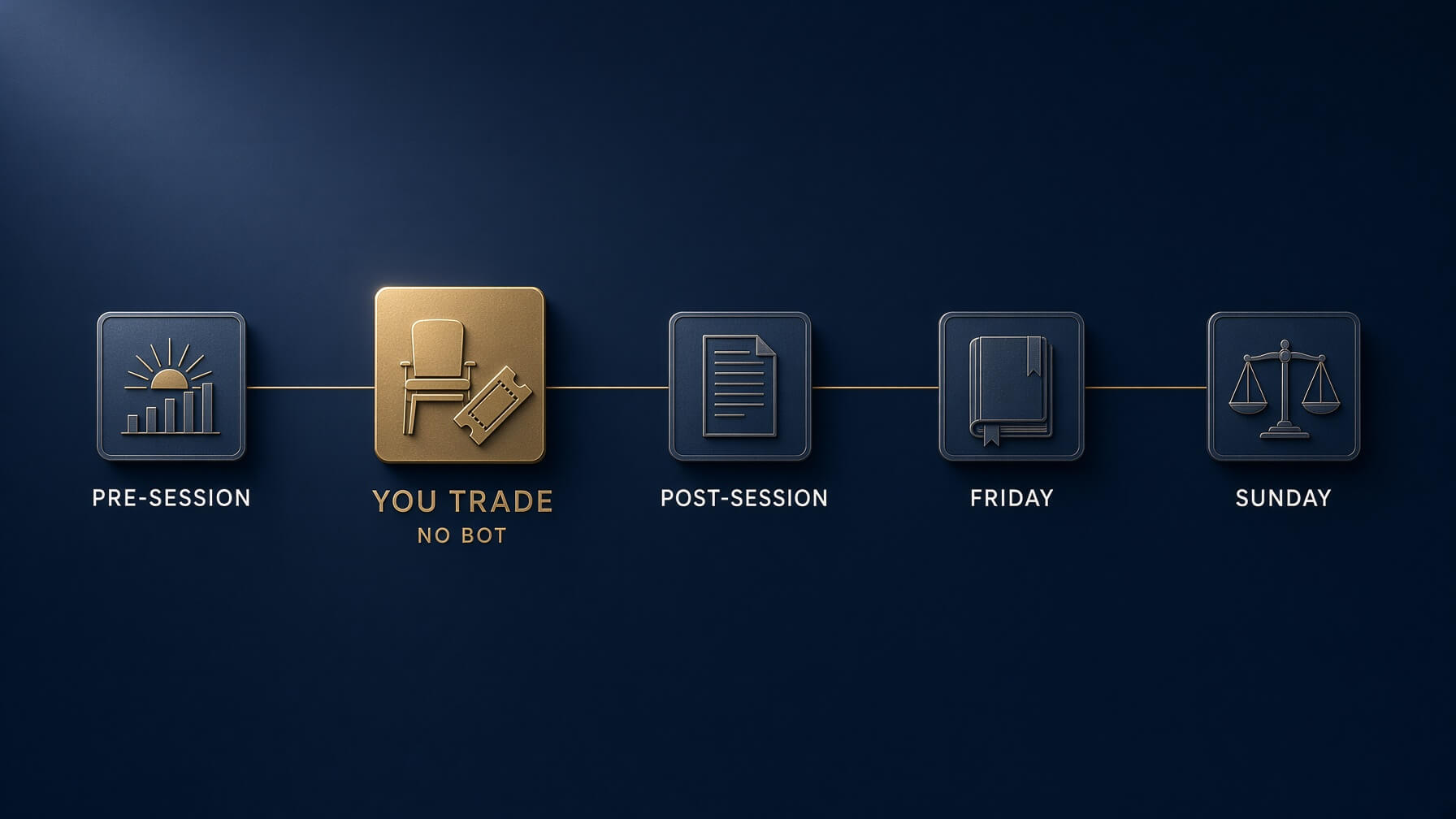
A desk without a rhythm is a folder of unread outputs. Five touchpoints, and none of them happen while you are in a position.
- Pre-session. Chief of Staff brief. Trade or no-trade, calendar, open risk, the rule under pressure, three lines on the overnight tape. Under five minutes.
- Session. Human only. The desk is closed. Nothing on this list runs while you have risk on, because the only reason to consult a bot mid-trade is to be talked into or out of something, and both are bad.
- Post-session. Journal, against the fixed template, same day. Not tomorrow. The details you lose overnight are the ones that mattered.
- Friday. Journal weekly pattern report, then Tax and Ops catch-up on fees and lots. Twenty minutes, and it removes February from your calendar.
- Sunday. Risk Auditor reads the week. Read it before you plan the next one, not after.
Research sits outside the rhythm. You call it when the calendar or your own uncertainty demands it, not on a schedule, because a research bot with a daily slot will invent things to research.
The handoff protocol
Six lines. Pin them wherever your desk lives.
- The Chief of Staff may request a memo from Research. Research answers the Chief of Staff, not you, during the session.
- Research does not talk to the Journal. Today’s facts do not get to grade yesterday’s decisions.
- The Journal may flag a rule break to the Risk Auditor. It does not decide what happens about it.
- The Risk Auditor reports to you only, and nothing it says changes a live position automatically.
- Tax and Ops touches no other seat. It reads statements and writes records.
- Nobody changes size, stops or targets. That is one person on this desk, and it is you.
On Path A, where bots share a channel and can pass work between themselves, write this into the manager bot’s instructions as a hard constraint. On Path B, you are the switchboard by default, which is one of the reasons the four-slot version is a reasonable place to start.
Eight ways this goes wrong
Every one of these has a fix, and the fix is always narrower instructions rather than a better model.
- Prompt rot. You tweak a block at 22:00 after a bad session, forget what you changed, and three weeks later the bot behaves oddly and you cannot say why. Fix: keep every instruction block in a dated file, paste from the file, and never edit in the settings panel. Re-read all of them on the first of the month.
- Source invention. The model produces a fluent paragraph with a statistic that does not exist. Fix: the “I could not verify this” clause, plus a date and source requirement on every number. Spot-check one claim a week at random. If it fails twice, that bot loses web access.
- Sunday over-staffing. A quiet weekend, a burst of enthusiasm, and you now have eleven bots and read the output of two. Fix: the official cap of roughly six, reuse before creating, and a personal rule of at most one new seat per month.
- Direction creep. The Chief of Staff starts appending an opinion. The Librarian mentions a level. Fix: treat it as a bug. Delete the output, re-paste the instruction block, and tighten the NEVER list. Do not argue with it in chat, because you are training yourself to negotiate with a bot about your own rules.
- Memory bleed across accounts. Demo results contaminate the funded journal, or two prop firms’ rules get averaged into a rule that belongs to neither. Fix: one channel or Workspace per account family, and given the shared-computer caveat, never treat separate bots as a substitute for separate files.
- Treating search as a fill. A number in a brief becomes a level you trade off. Fix: the desk never quotes a tradeable price. Prices come from your platform.
- Credential sprawl. You connect one small thing, then another, and eventually something with money behind it. Fix: a standing rule that no seat gets an account you could lose money from. Read-only where connection is unavoidable, and review connected tools monthly.
- The brief nobody reads. A routine fires at 05:30 and you scroll past it. Fix: if you skip a bot’s output twice in a row, retire the seat. An unread brief is theatre.
The thirty-day install

Do not hire eight bots on day one. Build the desk the way you would build a position, in tranches, with a review at each stage.
Week one: Chief of Staff and Journal. Nothing else. Write your risk rules, session rules and session template first, because these two seats are useless without them. By Friday you should have five briefs and five debriefs, and you should already be irritated by at least one of them.
Week two: Research, plus a proper container. Create the channel or Workspace, upload the playbook and risk rules, and move the first two seats into it. Give Research the source-hygiene block and test it deliberately: ask about something you already know well and see whether it invents an authority. If it does, tighten the block before you rely on it for anything you do not know.
Week three: Tax and Ops. Export a real CSV. Watch how many MISSING items it returns, because that number is a measure of your record-keeping, not the bot’s competence. Fix the records, not the prompt.
Week four: Risk Auditor on the bench. Run the first Sunday audit against three full weeks of journal entries. This is the first time the desk tells you something you did not already know about yourself.
Day thirty-one: cull. Any seat whose output you have skipped more than twice gets retired or rewritten. A four-bot desk you actually read beats a nine-bot desk you admire from a distance.
What you never automate
Worth writing on a card and keeping visible, because the temptation is always to automate the trade itself and call that efficiency.
- Entry, size, stop and target.
- Moving a stop.
- Anything holding broker, exchange or prop dashboard credentials.
- Final interpretation of a prop firm rule when a payout is at stake. Read the firm’s document.
- Filing anything with a revenue authority.
- The decision about whether you are fit to trade today. The Chief of Staff can present the evidence. You make the call.
The desk does prep, records and review. It does not make the trade. That last part stays with you.
Frequently asked questions
Do I need Grok Bot, or will grok.com Custom Agents do?
Custom Agents will do, and for most readers it is the right starting point. Four slots is exactly the four-seat desk. You lose scheduled routines and bot-to-bot handoffs, which means you open the chat yourself each morning. That is a mild inconvenience and a genuine safety feature. Move to Grok Bot when the manual steps have become the bottleneck, not before.
Can a Grok bot place trades for me?
A Grok Bot has a browser and can sign into websites with your credentials, so the honest answer is that it is technically capable of far more than it should ever be allowed to do. That is precisely why every instruction block in this guide contains an explicit prohibition, and why no seat on this desk gets a broker login. Treat execution as a boundary the desk never crosses.
How many bots do I actually need?
Four. The official Grok Bot guides cap a roster at roughly six for a reason, and a trading desk needs fewer seats than a software project. If you cannot articulate in one sentence what a bot does that no other seat does, you do not need it.
Is it safe to give a bot my broker statements?
An exported CSV is far safer than a live connection, but it is still your financial history sitting on someone else’s infrastructure. Strip account numbers before uploading, use a dedicated Workspace, and check what your provider’s retention and training policies say rather than what you assume they say. If a document would trouble you in a breach notification, do not upload it.
FREE DOWNLOAD · NO EMAIL REQUIRED
The Grok Trading Desk Field Guide
Nineteen pages, built from this article. All six seats with their full copy-paste instruction blocks, the weekly cadence, the handoff protocol, the eight failure modes and the thirty-day install order. Print it, or keep it open beside the settings screen while you build.
No form, no wall. If it turns out to be useful, the newsletter is where the next one goes out.
Where to go next
If you are earlier in the process, start with the fundamentals rather than the roster. Our complete guide to AI for traders covers what these models can and cannot do for a discretionary trader, and the best AI trading tools in 2026 separates what works from what is being sold. For single-chat workflows that need no setup at all, five ChatGPT coaching workflows and using AI for trading research are the shallower end of the same pool.
Two of the seats above have standalone versions worth reading before you automate them: building a personal trading edge report, which is essentially the Risk Auditor’s job done once by hand, and building a pre-market dashboard with free tools, which is the Chief of Staff’s brief without the bot.
And before you write a single instruction block, you need the documents the desk runs on. If your playbook and risk rules are still in your head, the Mind, Method and Money assessment will show you which pillar is thinnest, and the position sizing and risk calculators will give you the numbers your Risk Auditor is going to audit against.
The companion to this guide builds the same four seats in Claude Projects, where the architecture is different in one important way and the trade-offs land elsewhere. Same roster. Same rule: only you send the order.
 The Complete Trader's Edge
The full Mind · Method · Money framework. 70 chapters.
View on Amazon →
The Complete Trader's Edge
The full Mind · Method · Money framework. 70 chapters.
View on Amazon →
 Market Mayhem
400 years of bubbles, crashes, and the pattern that keeps repeating.
Buy on Amazon →
Market Mayhem
400 years of bubbles, crashes, and the pattern that keeps repeating.
Buy on Amazon →
 Greatest Companies
How the world's greatest companies were built — and what traders learn from them.
View on Amazon →
Greatest Companies
How the world's greatest companies were built — and what traders learn from them.
View on Amazon →