

VERDICT · 7.8 / 10 · PRICES CHECKED 18 NOVEMBER 2026
OpenMarket is a browser terminal that puts order-book heatmaps, footprints, CVD and 16 charts per layout on a free plan, across crypto, CME futures, US stocks, forex, options and prediction markets.
It is the most generous free order-flow plan we have reviewed. The catches are that live CME and US stock data cost extra (from $7 and $19 a month), the free plan has only 3 data-indicator slots, and the company renamed itself from Kiyotaka this year. Best for crypto and futures traders who want order flow without a desktop install; less suited to traders who live in drawing tools.
OpenMarket made itself impossible to ignore in September, when it made its core terminal free and aimed its launch post straight at TradingView’s $2,399-a-year top plan. We have already compared the two head to head in OpenMarket vs TradingView. This review looks at OpenMarket on its own terms: what it is, what each part does, what it really costs once you add live data, and who should use it.
HOW WE REVIEWED OPENMARKET
This review is built from OpenMarket’s pricing page, plan FAQ, documentation and release notes, checked on 18 November 2026, and from a feature-by-feature comparison with the platforms we have already reviewed. Screenshots are OpenMarket’s own. We have not run a funded account through it, so where we describe how a feature behaves, we are reporting what OpenMarket says it does.
OpenMarket Review: At a Glance
OpenMarket at a glance
| OpenMarket | |
|---|---|
| What it is | Browser-based charting, order-flow and market-data terminal |
| Formerly | Kiyotaka (kiyotaka.ai) |
| Price | Free; Plus $35/mo, or $29/mo billed annually ($348) |
| Live data add-ons | CME L1 from $7/mo; CME full depth from $45/mo; US stocks $19/mo |
| Markets | Crypto (29 venues), CME futures, 5,500+ US stocks and ETFs, 1,200+ FX pairs, options, prediction markets, 5,600+ economic series |
| Order flow | Order-book heatmap, footprint, CVD, TPO, liquidation maps, aggregated order book |
| Scripting | wrun: TypeScript syntax, compiled to WebAssembly |
| Trading | Tradovate, NinjaTrader and Rithmic (free); Hyperliquid (0.02% fee) |
| Apps | Browser; desktop beta (macOS, Linux); Android; iOS beta |
| Our rating | 7.8 / 10 |
Sources: openmarket.xyz, openmarket.xyz/chart/plus and OpenMarket documentation, 18 November 2026. Data add-on prices are for private (non-professional) traders.
Who Should Use OpenMarket?
OpenMarket by trader type
| Trader type | Verdict | Why |
|---|---|---|
| Crypto intraday trader | ✓ Strong fit | Crypto data is live on the free plan, with heatmaps and footprints aggregated across exchanges |
| CME futures trader on a prop account | ✓ Strong fit | Free Tradovate, NinjaTrader and Rithmic connection; live footprint from $7 a month |
| Multi-market watcher | ✓ Strong fit | 16 charts per layout and 200 price alerts for $0 |
| Developer building indicators | ✓ Good fit | TypeScript syntax, order-book and funding data inside scripts |
| Price action or ICT trader | △ Conditional | Usable, but TradingView’s drawing workflow and community are deeper |
| US stock swing trader | △ Conditional | Stocks are 15 minutes delayed unless you pay $19 a month |
| Windows desktop user | △ Conditional | Desktop app is macOS and Linux only for now; Windows users run it in the browser |
CTE assessment, 18 November 2026.
OpenMarket Pros and Cons
Pros and cons
| ✓ Pros | ✗ Cons |
|---|---|
| Heatmaps, footprints and CVD on the free plan | Live CME and US stock data cost extra |
| 16 charts per layout on every plan | Only 3 data-indicator slots per workspace on Free; 2 per chart on big layouts |
| Live crypto data across 29 venues at no cost | Young platform, renamed in 2026; terms are likely to change |
| Free broker connection for Tradovate, NinjaTrader and Rithmic | No Windows desktop app yet; iOS app still in beta |
| 200 price alerts free, to Telegram, Discord, email or webhook | Smaller community and script library than TradingView |
| TypeScript scripting with order-flow data | Needs graphics acceleration; heavy layouts want a capable machine |
CTE assessment.
What Is OpenMarket?
OpenMarket is the new name for Kiyotaka, a terminal that built its reputation on crypto order-flow data. The release notes show how quickly it has grown: a rebuilt version 3 in December 2025 that the company says is about three times more CPU-efficient, US equities added in November 2025, an academy launched the same December, and API hostnames moved from kiyotaka.ai to openmarket.xyz in July 2026. On 27 September 2026 it made its core charting free.
The idea is one canvas for every market. Rather than a charting site with order flow bolted on, OpenMarket treats order flow, options data, prediction-market odds and economic releases as things you can put side by side and query in one place.

Markets and Data: What Is Live and What Is Delayed
OpenMarket’s coverage, from its own site:
- Crypto: 4,000+ perpetuals and spot pairs across 29 venues, plus Solana memecoins charted from their first trade.
- US stocks: 5,500+ stocks and ETFs on NYSE and Nasdaq.
- Futures: CME Group index, rates, energy and metals contracts.
- Forex: 1,200+ pairs, plus gold and silver.
- Options: crypto and CME options across 7 venues in one chain.
- Prediction markets and 5,600+ economic series from 40 publishers.
Breadth is not the same as live data. Exchange licensing decides what can be shown free:
Live and delayed data on OpenMarket
| Market | Every plan | To make it live |
|---|---|---|
| Crypto | Live | Nothing to add |
| CME futures | 10 minutes delayed | L1 from $7/mo; full depth from $45/mo; or your connected broker |
| US stocks | 15 minutes delayed, with a live price estimate | $19/mo |
Source: openmarket.xyz/chart/plus, 18 November 2026. No plan includes live exchange data; add-ons work on Free and Plus.
CME L1 makes trades and the best bid and ask live, so candles, footprint and CVD update in real time and alerts are no longer delayed. Full depth adds the order book: the live heatmap, the DOM, pull and stack, and depth replay. On L1 alone, OpenMarket says the heatmap’s depth stays about 10 minutes behind.
Charting, Layouts and Indicators
Every plan gets up to 16 charts per layout. Free adds 10 workspaces and 3 widgets per layout; Plus raises those to 50 and 10. There are 80+ built-in indicators, and classic ones such as RSI, moving averages and MACD do not count against any limit.
The limit that matters is data indicators, the order-flow and market-data studies. Free has 3 slots for the whole workspace. Plus has 10 on each chart. Big layouts run 2 per chart on every plan. OpenMarket’s own FAQ says this is the limit people reach first, and it is the main reason to pay for Plus.
If your charting is mostly drawing, this matters less than it sounds. Price-action and ICT traders need levels, sessions and structure, and those do not use data-indicator slots. Our ICT liquidity guide covers the levels worth marking.
Order Flow: Heatmap, Footprint and CVD
This is OpenMarket’s core. The free plan includes order-book heatmaps, footprints, cumulative volume delta, TPO, liquidation maps and an aggregated order book on any market, plus a funding-rates suite for crypto. Plus raises the heatmap from normal to maximum depth and adds CME L3 order flow, CME second-based intervals and custom interval widths.


Aggregation is the useful part for crypto. A single exchange’s book is a partial picture; seeing several venues together removes some of the noise from one venue’s liquidity. It does not remove the basic problem with any heatmap: resting orders can be pulled before price reaches them. Our order flow guide explains how to read the tape without over-reading it.
Options Tools
OpenMarket’s user guides cover volatility surfaces, options flow, gamma exposure (GEX) and term structure, with crypto and CME options in one chain. For futures traders who watch where dealers may need to hedge, that is unusual on a free platform. Treat GEX levels as context, not signals: they are estimates built on assumptions about who holds which side.
Scripting: wrun
Custom indicators and strategies are written in wrun, using TypeScript syntax. Code compiles to WebAssembly and runs live in the browser, or in OpenMarket’s cloud when you want it kept private. The documentation lists 52 technical-analysis classes, order-flow and alert functions, publishing, and a strategy tester for turning an indicator into a backtest. Scripts can read aggressive buy and sell volume per exchange, order-book levels, funding and open interest.
Free accounts can save 100 private scripts; Plus allows 500. Every plan can use the community library. Under the Kiyotaka name the language was called kScript, so older tutorials may use that name.
A strategy tester is only as good as the data and the assumptions behind it. Our backtesting guide covers the mistakes that make a backtest look better than live trading will be.
AI: Kata and Bring-Your-Own Agent
Kata, OpenMarket’s built-in assistant, finds markets, indicators and tools from a plain-language description and can write an indicator from one. You can also connect your own AI agent, with Claude, ChatGPT, Cursor, Codex and Claude Code named on its site, and let it change the chart: switch symbols, add indicators or place drawings.
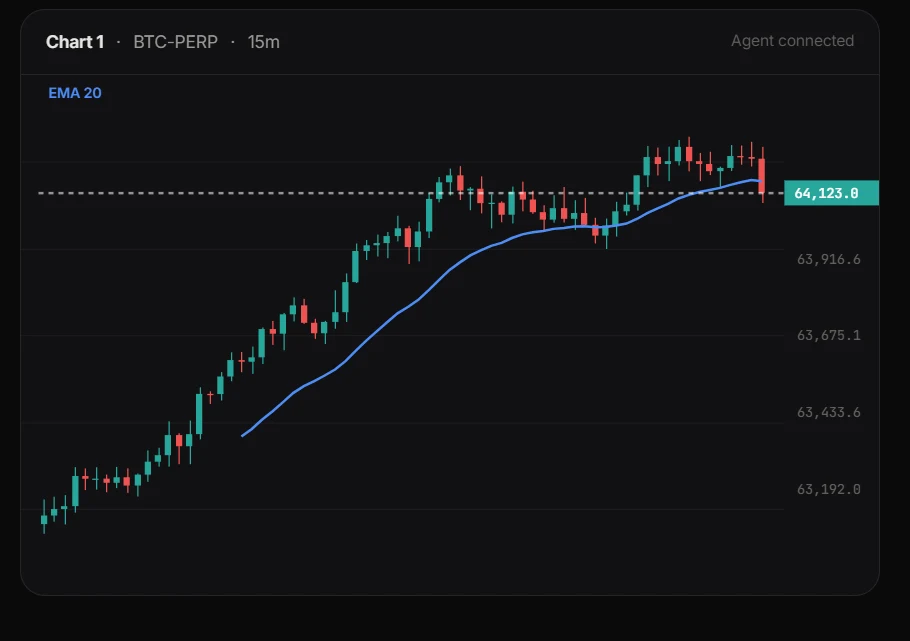
It is fast. That is the risk as well as the benefit: an indicator written in seconds needs the same testing as one written by hand.
Alerts
Free includes 200 price alerts and 5 indicator alerts; Plus gives 500 and 50. Alerts can fire on price, prediction-market odds or your own script, and arrive in the app or by Telegram, Discord, email or webhook. Alerts built from scripts can be published and shared. Note that on a delayed market, alerts are delayed too until you add live data.
Trading From the Chart
Connecting a Tradovate or NinjaTrader account, or a Rithmic login, and trading from the chart is free on every plan, with no OpenMarket fee on futures orders. Prop firm accounts connect when the firm gives you one of those; CQG and dxFeed accounts do not, and nor do free Rithmic demo or trial logins. A connected broker with its own live CME data makes your candles, footprint, volume profiles and CVD live in that browser, while the heatmap, DOM, TPO and alerts stay 10 minutes behind. Futures trading works in a desktop browser, not the phone app.
For crypto, OpenMarket offers execution on Hyperliquid from your own wallet, with a 0.02% fee per order shown on the ticket before you confirm.
Before using any third-party platform on a funded account, check your firm allows it. Our guide to prop firms that accept US traders covers which firms run on which platforms.
Apps, Hardware and Reliability
OpenMarket is browser-first. The desktop app is in beta for macOS (Apple silicon and Intel) and Linux; Windows is listed as coming soon. There is an Android app and an iOS beta through TestFlight, both with charts, alerts and chat.
When we opened the chart in a browser with graphics acceleration switched off, OpenMarket refused to draw until we turned it on. Most computers have it on by default, but older machines, locked-down work laptops and remote desktops may struggle with a 16-chart layout of live heatmaps.
The OpenMarket API
Plans cover the charting platform; the data API is priced separately for developers. Its plans page lists a free tier for evaluation (10 requests a minute, 7 days of history), Standard at $166 a month billed annually ($1,990 a year) with 90 days of history, and Advanced at $499 a month billed annually ($5,990 a year) with a year of history. One endpoint covers candles, open interest, funding, liquidations, heatmaps and TPO, with WebSocket streams for trades, order books and liquidations. Most traders will never need it.
OpenMarket Pricing
OpenMarket Free vs Plus
| Feature | Free | Plus |
|---|---|---|
| Price | $0 | $35/mo, or $29/mo billed annually |
| Data indicators | 3 per workspace | 10 per chart |
| Charts per layout | 16 | 16 |
| Workspaces | 10 | 50 |
| Widgets per layout | 3 | 10 |
| Price alerts | 200 | 500 |
| Indicator alerts | 5 | 50 |
| Private scripts | 100 | 500 |
| Devices at once | 1 | 5 |
| Heatmap depth | Normal | Maximum |
| CME seconds and L3 order flow | No | Yes |
Source: openmarket.xyz/chart/plus, 18 November 2026. Plus does not include live exchange data. You can upgrade instantly and downgrade at the end of a billing cycle.
The realistic cost depends on what you trade. Crypto traders can stay at $0. A CME futures trader who wants live footprint and CVD needs at least the $7 L1 add-on, or $45 for a live heatmap. Add Plus if three data indicators are not enough. Our TradingView comparison sets those totals against TradingView’s plans.
The Honest Counterweight
- Free products change. OpenMarket says Free is not a trial. It still has to earn money through Plus, data add-ons, the API and trading fees. Expect the free tier to look different in a year, and do not build a workflow you cannot move.
- Young, and renamed. The Kiyotaka-to-OpenMarket switch happened this year, the desktop app is in beta and Windows is not supported. That is fine for a second screen; think harder before making it your only one.
- The marketing is loud. “16 charts free” is true. “Live CME order flow free” is not, unless your broker supplies the data.
- Order flow is easy to over-read. Heatmaps are compelling to watch. Most traders who add them change what they look at, not what they do.
OpenMarket Through Mind, Method and Money
Mind. A free terminal with every market on it is a temptation to watch everything. Sixteen charts invite sixteen opinions. Decide which three or four markets you actually trade and build the layout around them.
Method. Use order flow to confirm a level your method already marked, not to find new trades mid-session. If you cannot write down how a footprint or heatmap changes your entry, exit or size, it is not part of your method yet.
Money. Count the full cost: data add-ons, Plus if you need it, and 0.02% on every Hyperliquid order. Then keep risk per trade fixed whatever the screen shows. The position sizing guide and trading calculators handle the arithmetic.
Final Verdict: 7.8 / 10
OpenMarket is the strongest free order-flow terminal we have reviewed. For crypto traders it is close to a complete toolkit at no cost. For CME futures traders, especially on Tradovate, NinjaTrader or Rithmic prop accounts, it is the cheapest route we know of to live footprint and CVD in a browser. It loses points for its youth, the missing Windows app, the tight free indicator limit and the gap between its headline claims and the data costs underneath them.
Our recommendation: open a free OpenMarket account, use it beside your current platform for a month, and only move more of your workflow once you can name what it does better for you.
Related Reading
- OpenMarket vs TradingView – the head-to-head, with full cost comparison.
- TradingView Alternatives 2026 – eight platforms grouped by the gap they fill.
- Bookmap Review – the heatmap specialist.
- GoCharting Review 2026 – the other browser order-flow platform.
- ATAS Review – the desktop footprint workstation.
- How to Trade Futures – the contracts behind the CME data.
Frequently Asked Questions
Is OpenMarket free?
Yes. The Free plan is not a trial: 16 charts per layout, heatmaps, footprints, 200 price alerts and free broker connection. Crypto data is live; CME futures are 10 minutes delayed and US stocks 15 minutes delayed unless you add live data, from $7 and $19 a month.
Is OpenMarket the same as Kiyotaka?
Yes. Kiyotaka renamed itself OpenMarket and moved from kiyotaka.ai to openmarket.xyz in 2026. Its scripting language, previously kScript, is now wrun.
Is OpenMarket safe to use?
OpenMarket is a charting and data platform, not a broker, so it does not hold your money. Futures orders go to your own broker; Hyperliquid orders are signed from a wallet you control. As with any platform you connect to a trading account, use strong security on both.
Does OpenMarket work with prop firms?
Yes, when the firm gives you a Tradovate or NinjaTrader account or a Rithmic login. CQG and dxFeed accounts do not connect. Check that your firm allows third-party platforms.
What is OpenMarket Plus?
The paid plan: $35 a month, or $29 a month billed annually. It raises indicator, alert, workspace and device limits and adds maximum heatmap depth, CME L3 order flow and CME second-based intervals. Live exchange data is still a separate add-on.
Does OpenMarket have backtesting?
Yes, through wrun. The documentation describes turning an indicator into a strategy and reading the results in a strategy tester.
The takeaway. OpenMarket gives away more order-flow tooling than any platform we have reviewed. Budget for live data if you trade futures, and run it beside your current setup before you rely on it.
Comparing platforms? The CTE Trading Tools Hub groups every platform we rate, with links to each full review.
This article is educational and is not financial advice. The OpenMarket links on this page are affiliate links: if you sign up through them, CTE may earn a commission at no extra cost to you. This does not affect our rating, and OpenMarket did not review the article before publication. Prices, limits and features are taken from openmarket.xyz, openmarket.xyz/chart/plus, OpenMarket’s documentation, API plans page and release notes, checked on 18 November 2026. Screenshots are OpenMarket’s. Prices and plans change; check OpenMarket’s site before you pay. Trading leveraged products carries a high risk of loss.
 The Complete Trader's Edge
The full Mind · Method · Money framework. 70 chapters.
View on Amazon →
 Market Mayhem
400 years of bubbles, crashes, and the pattern that keeps repeating.
Buy on Amazon →
 Greatest Companies
How the world's greatest companies were built — and what traders learn from them.
View on Amazon →
 Greatest Traders
Eighty-six lives that explain the markets — Livermore to Madoff, told with the losses left in.
View on Amazon →